vScriptValRippleDisplacer
Displaces points with a moving wave and writes five copies with different time offsets.
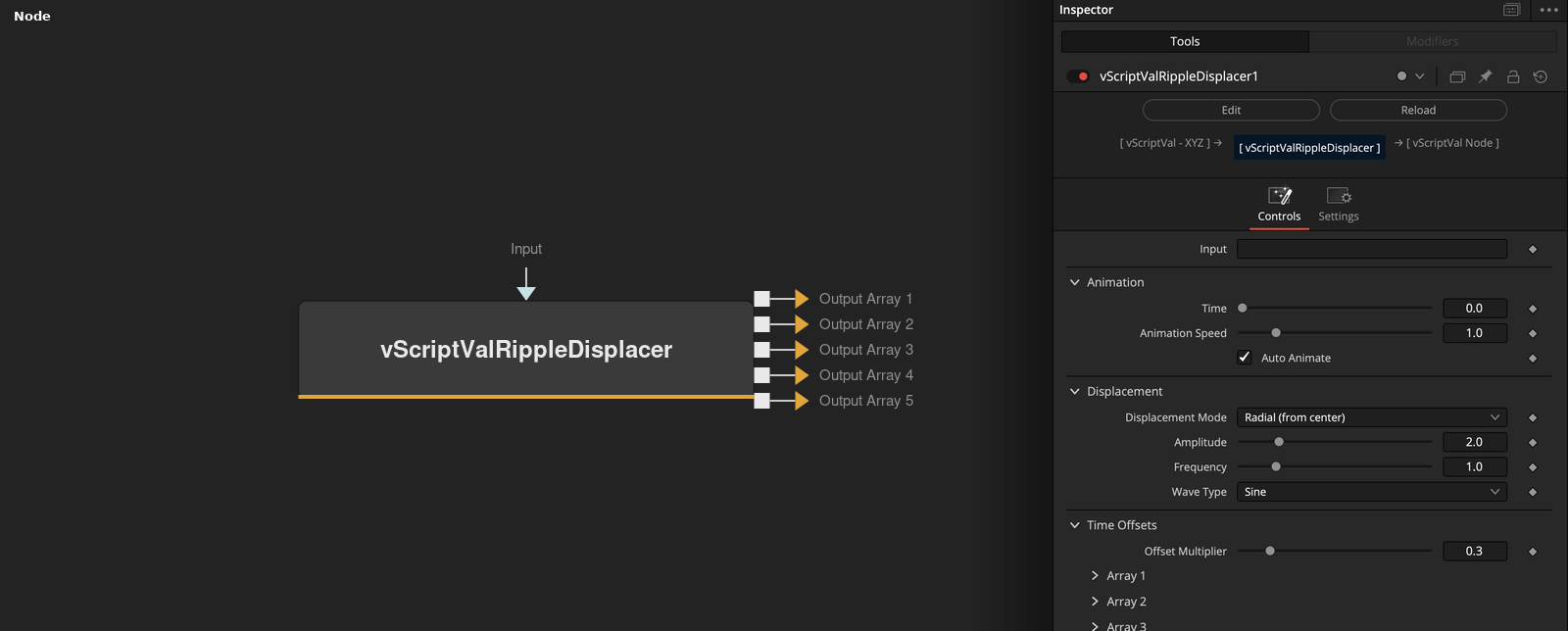
vScriptValRippleDisplacer takes an array of XYZ points and outputs five displaced copies of it on five outputs. Each copy uses the same wave with its own amplitude, frequency and time offset.
Parameters
| Parameter | Type | Default | Description |
|---|---|---|---|
| Input | ScriptVal | — | Data to process. |
| Time | Float | 0.0 | Time used when Auto Animate is off. Ignored while Auto Animate is on. Slider 0 to 10, default 0. |
| Animation Speed | Float | 1.0 | Multiplies the render time when Auto Animate is on. Slider 0.1 to 5, default 1. |
| Auto Animate | Integer | 1.0 | Uses the render time times Animation Speed times 0.1 as time when on (default). |
| Displacement Mode | Dropdown | Radial (from center) | Radial (from center) (default), Z-Axis Only or XYZ Uniform. |
+5 more parameters
| Parameter | Type | Default | Description |
|---|---|---|---|
| Amplitude | Float | 2.0 | Size of the displacement, multiplied into each output. Slider 0 to 10, default 2. |
| Frequency | Float | 1.0 | Frequency of the wave, multiplied into each output. Slider 0.1 to 5, default 1. |
| Wave Type | Dropdown | Sine | Sine (default), Cosine, Triangle or Square. |
| Offset Multiplier | Float | 0.3 | Multiplies the time offsets of the outputs, not the displacement. Slider 0 to 2, default 0.3. |
| Debug Mode | Integer | 0.0 | Prints information to the console when on. Default off. |
Read the full description
Each point is moved by wave(time + 0.1 * index, Frequency) * Amplitude. Wave Type is Sine, Cosine, Triangle or Square. Displacement Mode moves the point away from the origin (Radial), along Z only, or by the amount on Z and a tenth of it on X and Y (XYZ Uniform). A point at the origin moves to (d, d, d) in Radial mode.
Output n uses the amplitude, frequency and time offset of its Array n controls. Their defaults step up per output (amplitude 1 + 0.2 * (n - 1), frequency 1 + 0.1 * (n - 1), time offset 0.3 * (n - 1)), so the outputs ripple at different times. Time Offset times Offset Multiplier (default 0.3) shifts each copy in time. With Auto Animate on (default) the time is the render time times Animation Speed times 0.1. A disabled array gives an empty output.
Example Connections
- Ripple a grid and draw the first copy
- Use a later copy
vScriptValPointsOnGrid.Output -> vScriptValRippleDisplacer.ArrayA
vScriptValRippleDisplacer.Arrays_1 -> vScriptValCameraProjection.ArrayA
vScriptValCameraProjection.Output -> vScriptValShapeRender.ArrayPoint
Background.Output -> vScriptValShapeRender.Input
vScriptValPointsOnCircle.Output -> vScriptValRippleDisplacer.ArrayA
vScriptValRippleDisplacer.Arrays_3 -> vScriptValTranslate.Input