vScriptValAlignToMesh
Replaces each point with the normal at, the position of, or a blend toward the closest mesh vertex.
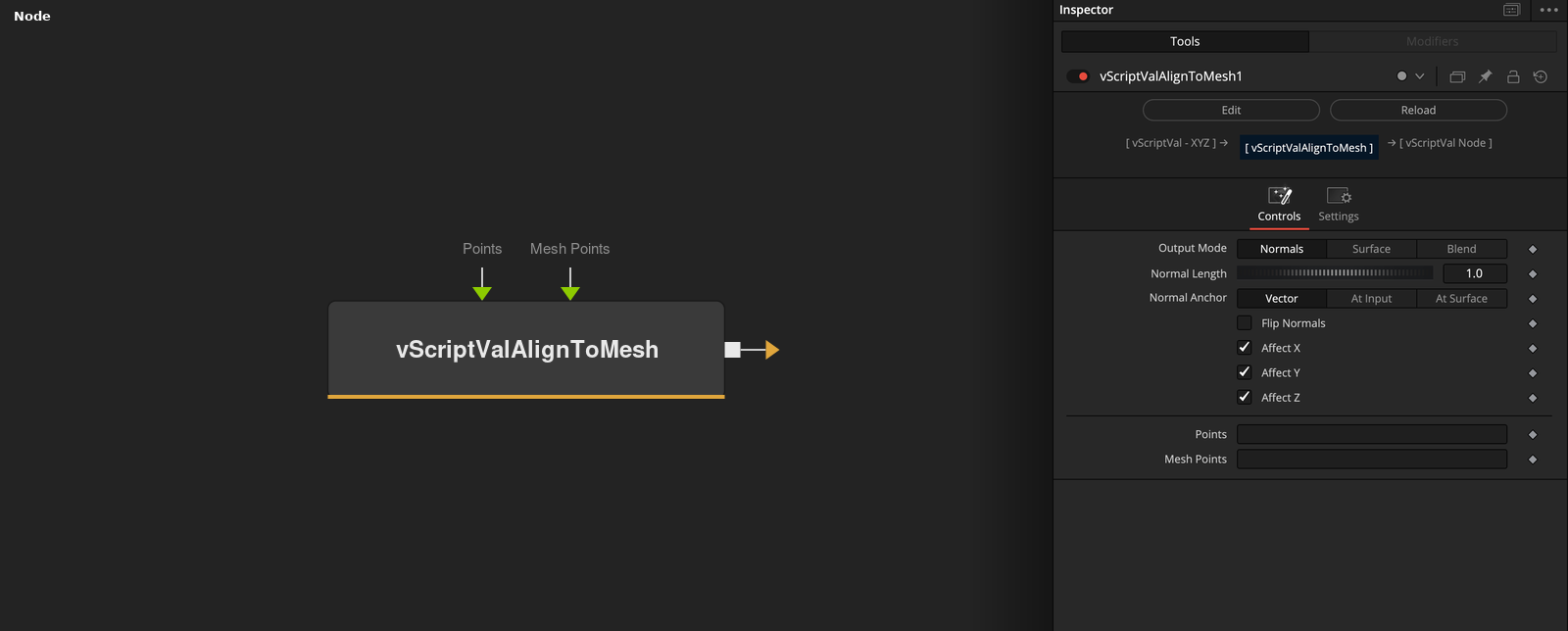
vScriptValAlignToMesh takes an array of XYZ points and a mesh, and finds the closest Mesh Points vertex for every input point. Output Mode decides whether the node writes the normal estimated there, the vertex position, or a blend between the input and the vertex.
Parameters
| Parameter | Type | Default | Description |
|---|---|---|---|
| Output Mode | Dropdown | Normals | Normals (default), Surface or Blend. Normals writes the normal estimated at the closest vertex, Surface the vertex position and Blend a mix of input and vertex. |
| Normal Length | Float | 1 | Length of the output normal. Minimum 0, slider 0 to 5, default 1. Shown in Normals mode only. |
| Normal Anchor | Dropdown | Vector | Vector (default) outputs the normal alone, At Input adds it to the input point and At Surface adds it to the closest vertex. Shown in Normals mode only. |
| Flip Normals | Float | 0 | Reverses the normal. Default off. Shown in Normals mode only. |
| Blend To Surface | Float | 1 | Mix between the input point (0) and the closest vertex (1). Range 0 to 1, default 1. Hidden unless Output Mode is Blend. |
+5 more parameters
| Parameter | Type | Default | Description |
|---|---|---|---|
| Affect X | Float | 1 | Checked (default): X comes from the result. Unchecked: X keeps the input value. Surface and Blend only. |
| Affect Y | Float | 1 | Checked (default): Y comes from the result. Unchecked: Y keeps the input value. Surface and Blend only. |
| Affect Z | Float | 1 | Checked (default): Z comes from the result. Unchecked: Z keeps the input value. Surface and Blend only. |
| Points | DATATYPE | — | Point positions. |
| Mesh Points | DATATYPE | — | Points of the mesh that the input is compared with. |
Read the full description
For every input point the node finds the closest vertex of Mesh Points. Output Mode then writes the normal estimated at that vertex (Normals), the vertex position (Surface), or a point between the input and the vertex (Blend). The normal is fitted to the 8 nearest vertices and points away from the center of the mesh.
In Normals mode the normal is scaled by Normal Length (default 1) and Flip Normals reverses it. Normal Anchor outputs it alone, adds it to the input point or adds it to the vertex. Affect X, Y and Z apply to Surface and Blend only: an unchecked axis keeps the input value. Blend To Surface (0 to 1, default 1) is used in Blend mode.
Only the vertex list of Mesh Points is used, not its edges or faces. If either input is empty, the output is empty.
Example Connections
- Align a grid to a loaded mesh and draw
- Snap the points to the surface
vScriptValPointsOnGrid.Output -> vScriptValAlignToMesh.ArrayPoints
vScriptValFromOBJ.Points -> vScriptValAlignToMesh.MeshPoints
vScriptValAlignToMesh.Output -> vScriptValCameraProjection.ArrayA
vScriptValCameraProjection.Output -> vScriptValShapeRender.ArrayPoint
Background.Output -> vScriptValShapeRender.Input
vScriptValPointsOnGrid.Output -> vScriptValAlignToMesh.ArrayPoints
vScriptValFromOBJ.Points -> vScriptValAlignToMesh.MeshPoints
vScriptValAlignToMesh.Output -> vScriptValTranslate.Input