vScriptValPointAttractorSpring
Attracts or repels points with a spring-damper simulation that keeps its speed between frames.
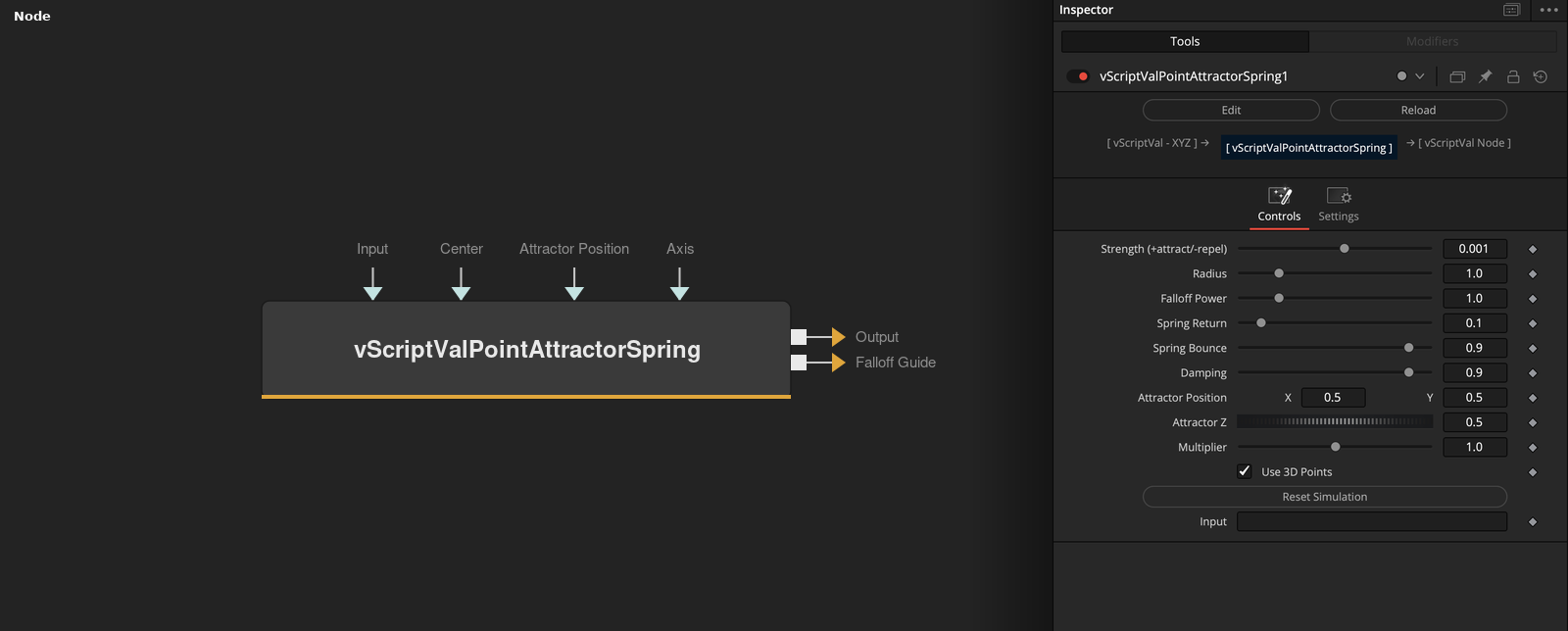
vScriptValPointAttractorSpring takes an array of points and runs one simulation step per frame. A spring pulls each point back to its input position, and the attractor pushes points inside Radius. A second output draws the radius as a circle.
Parameters
| Parameter | Type | Default | Description |
|---|---|---|---|
| Strength (+attract/-repel) | Float | 0.001 | Force at the attractor. Positive pulls, negative pushes. Slider -0.01 to 0.01, default 0.001. |
| Radius | Float | 1.0 | Distance within which the attractor acts. Minimum 0.000001, slider 0.001 to 5, default 1. |
| Falloff Power | Float | 1.0 | Exponent of the falloff. Minimum 0.01, slider 0.01 to 5, default 1. |
| Spring Return | Float | 0.1 | Strength of the pull back to the input position. Slider 0 to 1, default 0.1. |
| Spring Bounce | Float | 0.9 | Spring Bounce. Scales the damping term inside the spring. Slider 0 to 1, default 0.9. |
+11 more parameters
| Parameter | Type | Default | Description |
|---|---|---|---|
| Damping | Float | 0.9 | Multiplies the speed each frame. Slider 0 to 1, default 0.9. |
| Center | Point | — | Hidden control. Not read by the code. |
| Z Offset | Float | 0 | Hidden control. Not read by the code. |
| Attractor Position | Point | — | Attractor position in X and Y, as a point in the viewer. Default 0.5, 0.5, which is 0, 0 in the node. |
| Attractor Z | Float | 0.5 | Attractor position on Z, used with Use 3D Points. Slider -1 to 1, default 0.5. |
| Axis | Point | — | Hidden control. Not read by the code. |
| Relative Flare Offset | Float | 1.5 | Hidden control. Relative Flare Offset. Not read by the code. Default 1.5. |
| Multiplier | Float | 1 | Divides the attractor X and Y. Minimum 0.000001, slider 0 to 2, default 1. |
| Use 3D Points | Float | 1 | Simulates and outputs Z when on (default). Off gives 2 values per point. |
| Reset Simulation | Integer | 0.0 | Button. Restarts the simulation from the input points on the next frame. |
| Input | ScriptVal | — | Data to process. |
Read the full description
Each frame, every point gets a spring term toward its input position, (home - position) * Spring Return - speed * Spring Return * Spring Bounce, then, if it is inside Radius of the attractor, a push of Strength * (1 - (distance / Radius) ^ Falloff Power) along the line to the attractor. The speed is multiplied by Damping and added to the position. The speed carries over to the next frame, so points can overshoot.
The simulation restarts from the input points on the first frame, when the frame is not the previous one plus 1, when the point count changes, and when Reset Simulation is pressed. The Falloff Guide output is a circle of 65 points around the attractor at Radius. Defaults are Strength 0.001, Radius 1, Spring Return 0.1, Spring Bounce 0.9 and Damping 0.9.
Example Connections
- Spring a grid around a point and draw
- Draw the radius guide
vScriptValPointsOnGrid.Output -> vScriptValPointAttractorSpring.ArrayA
vScriptValPointAttractorSpring.Output -> vScriptValCameraProjection.ArrayA
vScriptValCameraProjection.Output -> vScriptValShapeRender.ArrayPoint
Background.Output -> vScriptValShapeRender.Input
vScriptValPointAttractorSpring.FalloffGuide -> vScriptValCameraProjection.ArrayA
vScriptValCameraProjection.Output -> vScriptValShapeRender.ArrayPoint