vArrayWeightMap
Turns a value per index into a normalized weight, and can apply it to points.
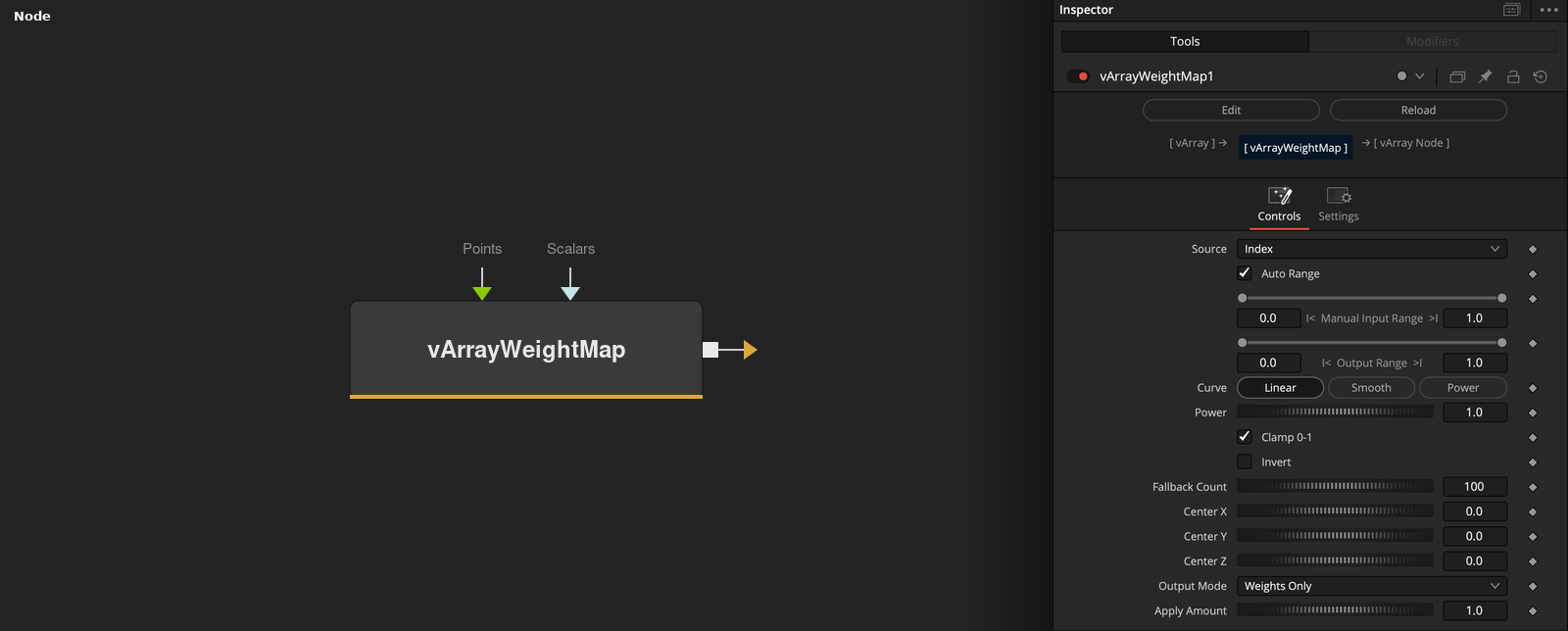
vArrayWeightMap reads a value for each index from the index, a scalar array, a point coordinate or the distance to a center, maps it to a weight between Out Min and Out Max, and outputs the weights or the points changed by them.
Parameters
| Parameter | Type | Default | Description |
|---|---|---|---|
| Source | Dropdown | Index | Index (default), Scalar Input, Position X, Position Y, Position Z or Distance From Center. Position and distance sources give 0 without Points. |
| Auto Range | Integer | 1.0 | Uses the smallest and largest value as the range when on (default). |
| RangeMin | Float | 0 | Low end of the manual range. Used when Auto Range is off. Default 0. |
| RangeMax | Float | 1 | High end of the manual range. Used when Auto Range is off. Default 1. |
| OutMin | Float | 0 | Weight at t = 0. Default 0. |
+13 more parameters
| Parameter | Type | Default | Description |
|---|---|---|---|
| OutMax | Float | 1 | Weight at t = 1. Default 1. |
| Curve | Dropdown | Linear | Linear (default), Smooth or Power. |
| Power | Float | 1 | Exponent for the Power curve. Minimum 0.001, slider 0.01 to 8, default 1. |
| Clamp 0-1 | Integer | 1.0 | Limits t to 0 to 1 when on (default). |
| Invert | Integer | 0.0 | Uses 1 - t when on. Default off. |
| Fallback Count | Integer | 100 | Number of weights when neither Points nor Scalars are connected. Slider 1 to 1000, default 100. |
| Center X | Float | 0 | X of the center for Distance From Center and Blend Toward Center. Default 0. |
| Center Y | Float | 0 | Y of the center for Distance From Center and Blend Toward Center. Default 0. |
| Center Z | Float | 0 | Z of the center for Distance From Center and Blend Toward Center. Default 0. |
| Output Mode | Dropdown | Weights Only | Weights Only (default), Store Weight in 4th Value, Multiply XYZ by Weight, Blend Toward Center or Offset XYZ by Weight. |
| Apply Amount | Float | 1 | Multiplies the weight in the point output modes. Slider -2 to 2, default 1. |
| Points | Text | — | Optional points. They set the count and feed the position and distance sources. |
| Scalars | Text | — | Optional numbers. They feed the Scalar Input source. |
Read the full description
The number of weights is the number of Points, else the number of Scalars, else Fallback Count (default 100). Source picks the value: the index, the Scalar Input value, Position X, Y or Z, or the distance to Center X, Y and Z. With Auto Range on, the smallest and largest value are the range, otherwise Range Min and Max are. t is (value - min) / (max - min), clamped if Clamp 0-1 is on (default), flipped by Invert, and shaped by Curve (Linear, Smooth or Power). The weight is Out Min + (Out Max - Out Min) * t.
Output Mode Weights Only (default) outputs the weights. With Points connected, the other modes output the points: Store Weight in 4th Value adds weight * Apply Amount as a fourth value, Multiply XYZ scales the point, Blend Toward Center moves it toward the center, and Offset XYZ adds the amount to all three axes.
Example Connections
- Weights by distance from the center
- Store weights on the points and draw
vArrayPointsOnGrid.Output -> vArrayWeightMap.Points
vArrayWeightMap.Output -> vArrayApplyMask.Mask
vArrayPointsOnGrid.Output -> vArrayWeightMap.Points
vArrayWeightMap.Output -> vArrayCameraProjection.ArrayA
vArrayCameraProjection.Output -> vArrayShapeRender.ArrayPoint
Background.Output -> vArrayShapeRender.Input