vArrayRampMap
Turns a number per point into a color from a ramp of four color stops.
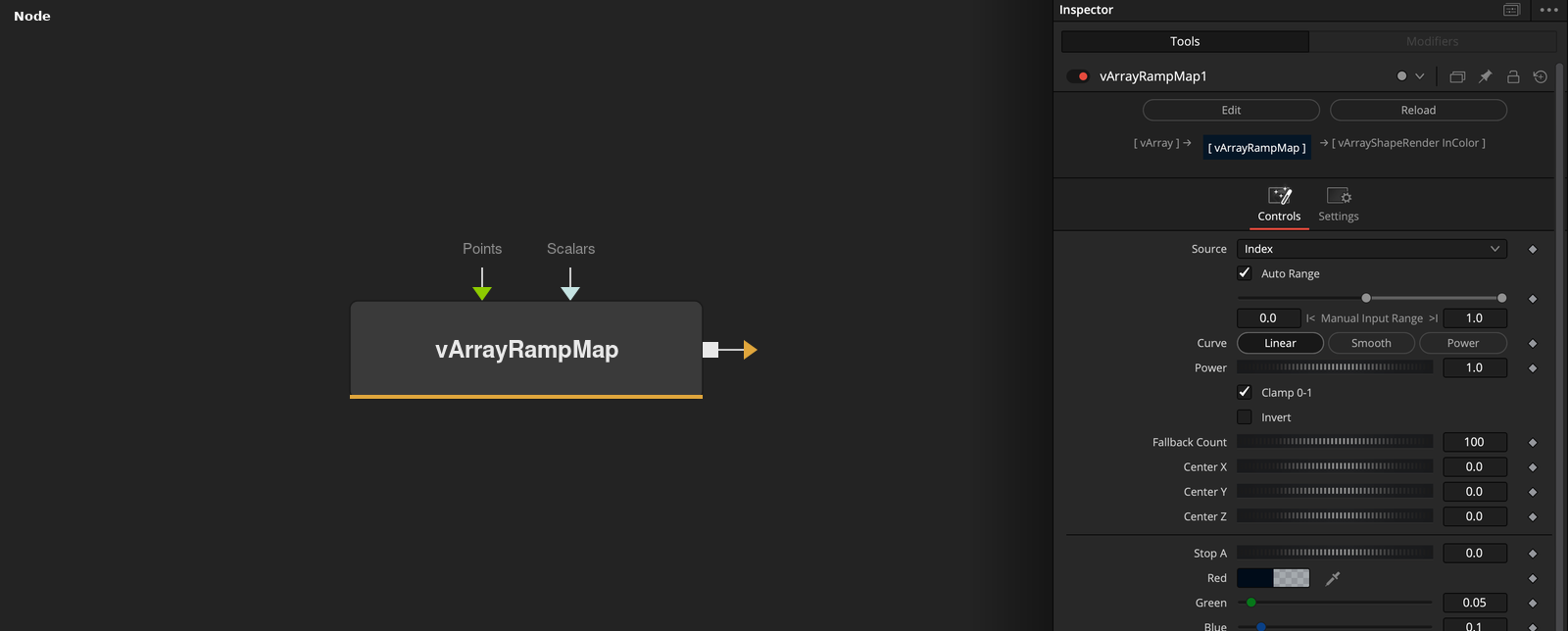
vArrayRampMap reads a value for each index from the index, a scalar array, a point coordinate or the distance to a center, and outputs a list of RGBA colors from a four-stop ramp. Curve shapes the transition.
Parameters
| Parameter | Type | Default | Description |
|---|---|---|---|
| Source | Dropdown | Index | Index (default), Scalar Input, Position X, Position Y, Position Z or Distance From Center. Position and distance sources give 0 without Points. |
| Auto Range | Integer | 1.0 | Uses the smallest and largest value as the range when on (default). |
| RangeMin | Float | 0 | Low end of the manual range. Used when Auto Range is off. Default 0. |
| RangeMax | Float | 1 | High end of the manual range. Used when Auto Range is off. Default 1. |
| Curve | Dropdown | Linear | Linear (default), Smooth or Power. |
+29 more parameters
| Parameter | Type | Default | Description |
|---|---|---|---|
| Power | Float | 1 | Exponent for the Power curve. Range 0.001 to 10, default 1. |
| Clamp 0-1 | Integer | 1.0 | Limits the position to 0 to 1 when on (default). |
| Invert | Integer | 0.0 | Reverses the ramp when on. Default off. |
| Fallback Count | Integer | 100 | Number of colors when neither Points nor Scalars are connected. Range 1 to 1000, default 100. |
| Center X | Float | 0 | X of the center for Distance From Center. Default 0. |
| Center Y | Float | 0 | Y of the center for Distance From Center. Default 0. |
| Center Z | Float | 0 | Z of the center for Distance From Center. Default 0. |
| Pos | Float | 0.0 | Position of stop A on the ramp, 0 to 1. Default 0. |
| Red | Float | 0.05 | Red of stop A. Default 0.05. |
| Green | Float | 0.10 | Green of stop A. Default 0.1. |
| Blue | Float | 0.35 | Blue of stop A. Default 0.35. |
| Alpha | Float | 1.0 | Alpha of stop A. Default 1. |
| Pos | Float | 0.33 | Position of stop B on the ramp, 0 to 1. Default 0.33. |
| Red | Float | 0.10 | Red of stop B. Default 0.1. |
| Green | Float | 0.55 | Green of stop B. Default 0.55. |
| Blue | Float | 0.85 | Blue of stop B. Default 0.85. |
| Alpha | Float | 1.0 | Alpha of stop B. Default 1. |
| Pos | Float | 0.66 | Position of stop C on the ramp, 0 to 1. Default 0.66. |
| Red | Float | 0.95 | Red of stop C. Default 0.95. |
| Green | Float | 0.72 | Green of stop C. Default 0.72. |
| Blue | Float | 0.20 | Blue of stop C. Default 0.2. |
| Alpha | Float | 1.0 | Alpha of stop C. Default 1. |
| Pos | Float | 1.0 | Position of stop D on the ramp, 0 to 1. Default 1. |
| Red | Float | 1.00 | Red of stop D. Default 1. |
| Green | Float | 0.20 | Green of stop D. Default 0.2. |
| Blue | Float | 0.10 | Blue of stop D. Default 0.1. |
| Alpha | Float | 1.0 | Alpha of stop D. Default 1. |
| Points | INPUT_DATATYPE | — | Optional points. They set the count and feed the position and distance sources. |
| Scalars | INPUT_DATATYPE | — | Optional numbers. They feed the Scalar Input source. |
Read the full description
The number of colors is the number of Points, else the number of Scalars, else Fallback Count (default 100). Source picks the value: the index, the Scalar Input value, Position X, Y or Z, or the distance to Center X, Y and Z. With Auto Range on, the smallest and largest value are the range, otherwise Range Min and Max are.
The position t is (value - min) / (max - min), clamped to 0 to 1 if Clamp 0-1 is on (default), flipped by Invert, then shaped by Curve: Linear, Smooth (smoothstep) or Power (t ^ Power). Each color is found on the ramp of stops A to D, which sit at Pos A to Pos D (defaults 0, 0.33, 0.66, 1). Below the first stop the color is A, above the last it is D, and in between it is blended linearly.
Example Connections
- Color a grid by index and draw
- Color by a scalar array
vArrayPointsOnGrid.Output -> vArrayRampMap.Points
vArrayPointsOnGrid.Output -> vArrayCameraProjection.ArrayA
vArrayCameraProjection.Output -> vArrayShapeRender.ArrayPoint
vArrayRampMap.Output -> vArrayShapeRender.JSONCustomColor
Background.Output -> vArrayShapeRender.Input
vArrayWeightMap.Output -> vArrayRampMap.Scalars
vArrayRampMap.Output -> vArrayShapeRender.JSONCustomColor