vScriptValFromPolyline
Sample a path drawn in the viewer into evenly spaced points, with flip, aspect and scale controls.
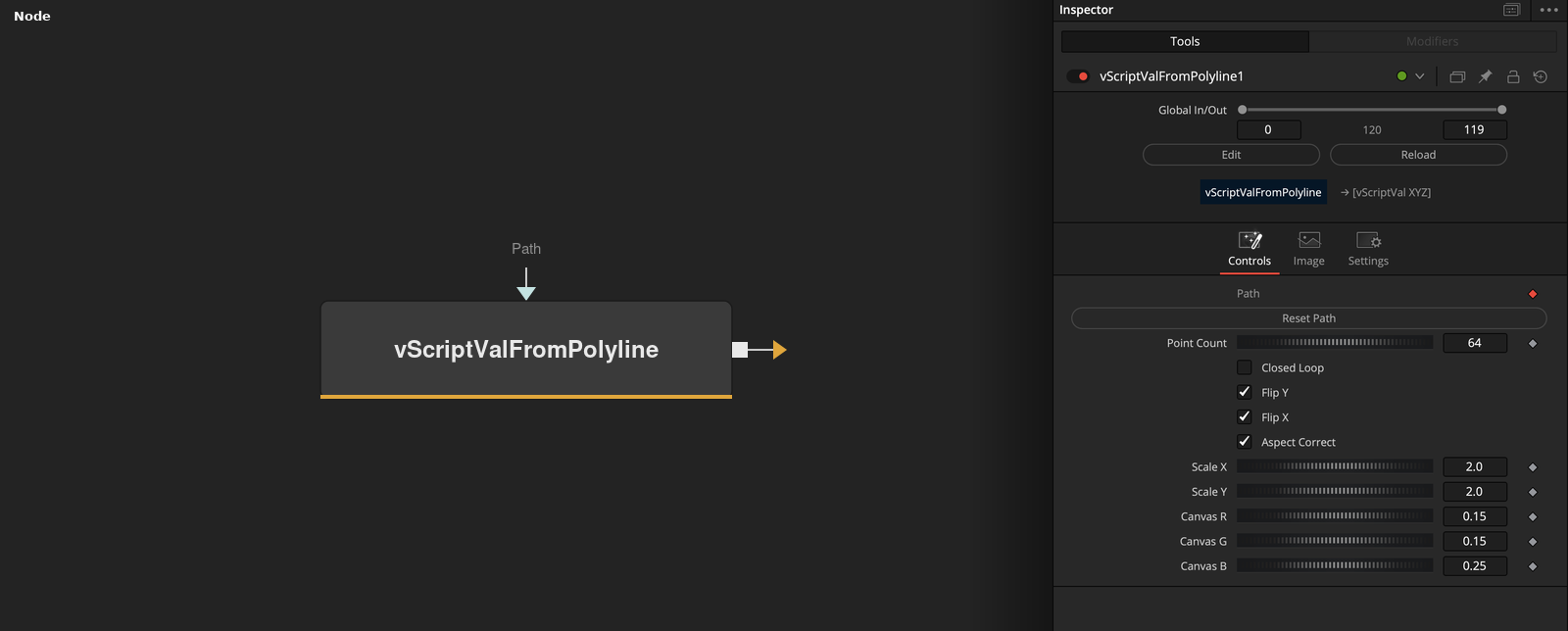
vScriptValFromPolyline outputs an array of XYZ points taken at equal distances along a path that is drawn in the viewer. Point Count sets how many points are taken, and Closed Loop decides whether the path is closed.
Parameters
| Parameter | Type | Default | Description |
|---|---|---|---|
| Reset Path | Integer | 0.0 | Button that clears the drawn path. |
| Point Count | Integer | 64 | Number of points taken along the path. Minimum 2, default 64. |
| Closed Loop | Integer | 0.0 | When on, the path is treated as closed and the first point is not repeated at the end. Default off. |
| Flip Y | Integer | 1.0 | Negates Y after sampling. Default on. |
| Flip X | Integer | 1.0 | Negates X after sampling. Default on. |
+6 more parameters
| Parameter | Type | Default | Description |
|---|---|---|---|
| Aspect Correct | Integer | 1.0 | Divides Y by 16 / 9. Default on. |
| Scale X | Float | 2.0 | Multiplier applied to X. Minimum 0, default 2. |
| Scale Y | Float | 2.0 | Multiplier applied to Y. Minimum 0, default 2. |
| Canvas R | Float | 0.15 | Red level of the image the node creates. Range 0 to 1, default 0.15. |
| Canvas G | Float | 0.15 | Green level of the image the node creates. Range 0 to 1, default 0.15. |
| Canvas B | Float | 0.25 | Blue level of the image the node creates. Range 0 to 1, default 0.25. |
Read the full description
The Path control is a spline that is drawn in the viewer. The node takes Point Count positions along the path at equal fractions of its length. Without Closed Loop the first point is at the start and the last at the end of the path. With Closed Loop on, the spacing is divided by Point Count instead of Point Count - 1, so the last point stops one step before the start and the first point is not repeated.
Each point is then changed in this order. Flip X and Flip Y negate the X and Y values. Aspect Correct divides Y by 16 / 9, a fixed ratio that does not depend on the image size. Scale X and Scale Y multiply the values. Z is always 0. Flip X, Flip Y and Aspect Correct are on by default, and both scales default to 2.
The node is a source tool and also creates an image. It fills the image with the color from Canvas R, Canvas G and Canvas B, so the path can be drawn and seen in the viewer. The image does not change the point output. If the path has fewer than two points, the output is an empty array.
Reset Path clears the drawn path. Point Count is rounded to a whole number and has a minimum of 2.
Example Connections
- Draw the sampled path
- Offset the points before drawing
vScriptValFromPolyline.Output -> vScriptValCameraProjection.ArrayA
vScriptValCameraProjection.Output -> vScriptValShapeRender.ArrayPoint
Background.Output -> vScriptValShapeRender.Input
vScriptValFromPolyline.Output -> vScriptValTranslate.ArrayA
vScriptValTranslate.Output -> vScriptValCameraProjection.ArrayA