vScriptValCreateFont
Convert text into outline points using a JSON font definition read from a file, a URL or pasted text.
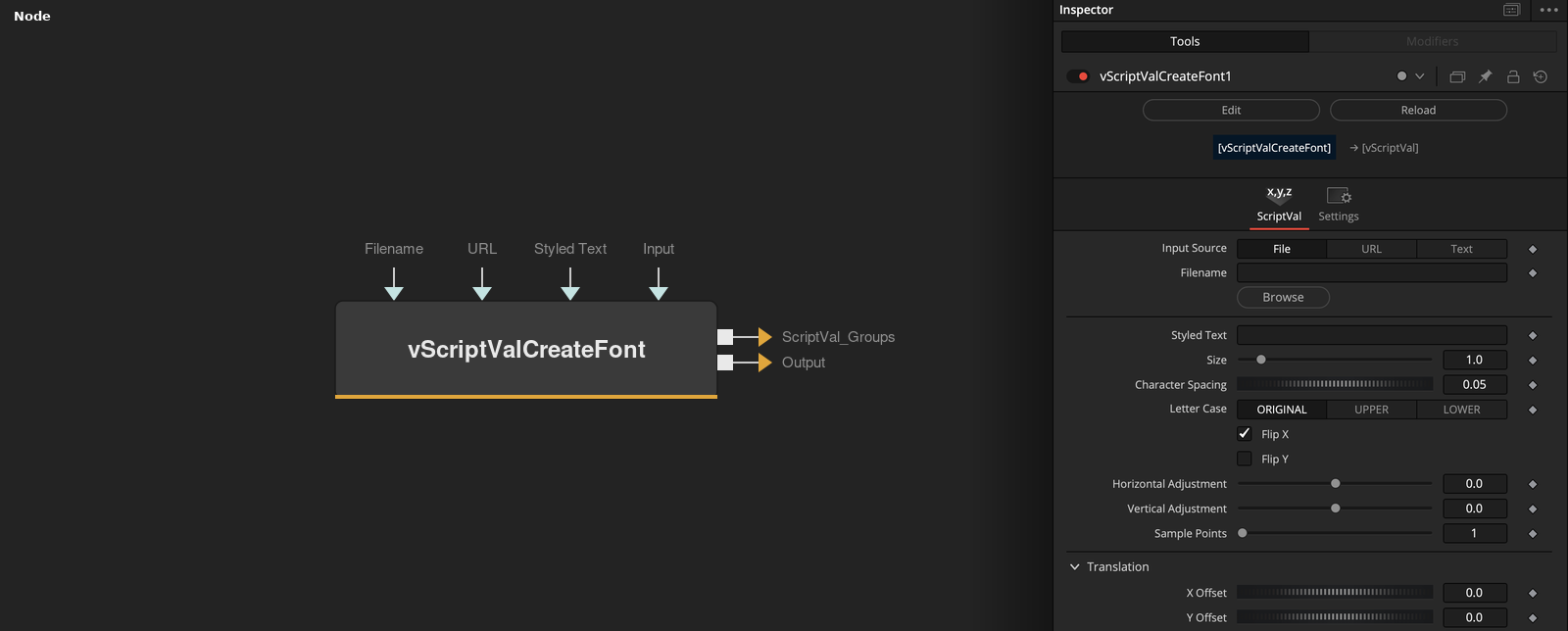
vScriptValCreateFont reads a JSON font that maps each character to its outline data and outputs the outline points of the text in Styled Text, and a Groups output with the number of outlines for each character. Input Source chooses where the font comes from.
Parameters
| Parameter | Type | Default | Description |
|---|---|---|---|
| Input Source | Dropdown | File | Where the JSON font comes from, File, URL or Text. Default File. |
| Filename | Text | — | Path of the JSON font file. Shown when Input Source is File. |
| URL | Text | — | Address of a JSON font. Shown when Input Source is URL. |
| Input | Text | — | JSON font text typed or pasted into the node. Shown when Input Source is Text. |
| Styled Text | Text | — | Text to convert. |
+20 more parameters
| Parameter | Type | Default | Description |
|---|---|---|---|
| Size | Float | 1.0 | Scale of the text when Lock X/Y is on. Default 1. |
| Character Spacing | Float | 0.05 | Gap added after each character, in units of 1000 font units. Default 0.05. |
| Line Spacing | Float | — | Hidden control. Distance added for each space, in units of 1000 font units, which works as word spacing. |
| Letter Case | Dropdown | ORIGINAL | Changes the text to ORIGINAL, UPPER or LOWER case before the lookup. Default ORIGINAL. |
| Flip X | Integer | 1.0 | Negates X. Default on. |
| Flip Y | Integer | 0.0 | Negates Y. Default off. |
| Justification | Dropdown | Left | Hidden control. It is not used in the calculation. |
| Horizontal Adjustment | Float | 0.0 | Value added to X of every point before rotation. Range -0.5 to 0.5. |
| Vertical Adjustment | Float | 0.0 | Value added to Y of every point before rotation. Range -0.5 to 0.5. |
| Sample Points | Integer | 1 | Keeps every Nth outline of each character. Range 1 to 10, default 1. |
| X Offset | Float | — | Offset in X, added after rotation and then scaled. |
| Y Offset | Float | — | Offset in Y, added after rotation and then scaled. |
| Z Offset | Float | 0.0 | Offset in Z, added after rotation and then scaled. |
| Rotation Order | Dropdown | XYZ | Hidden control. It is not used, the rotation is always applied in X, Y, Z order. |
| X Rotation | Float | — | Rotation around the X axis, in degrees. |
| Y Rotation | Float | — | Rotation around the Y axis, in degrees. |
| Z Rotation | Float | — | Rotation around the Z axis, in degrees. |
| Lock X/Y | Integer | 1 | Hidden control. When on, the scale comes from Size. When off, X Scale and Y Scale are used. Default on. |
| X Scale | Float | 1.0 | Hidden control. Scale in X, also used for Z, when Lock X/Y is off. Default 1. |
| Y Scale | Float | 1.0 | Hidden control. Scale in Y when Lock X/Y is off. Default 1. |
Read the full description
The font is a JSON object whose keys are characters. Each value is a list of outlines, and each outline is a flat list of X and Y values. The node looks up every character of the text, divides the coordinates by 5000, and places the characters one after another. The next character starts at the largest X of the previous one plus 1000 * Character Spacing, measured in font units. A space adds 1000 * Line Spacing instead, so that control works as word spacing.
Letter Case sets the text to upper case or lower case before the lookup, or leaves it as it is. Flip X is on by default and negates X, and Flip Y negates Y. Sample Points keeps every Nth outline of each character, starting with the first, and drops the others. The default of 1 keeps all of them.
Horizontal Adjustment and Vertical Adjustment are then added, the points are rotated by X, Y and Z Rotation with the matrices multiplied in X, Y, Z order, and X, Y and Z Offset are added. The values are multiplied by the scale. The scale is Size when Lock X/Y is on, and X Scale and Y Scale when it is off.
Every character other than a space must exist in the font, otherwise the node stops with an error. The Groups output holds one number for each character, the count of outlines that were kept. The Output socket is the points of all outlines in order. Rotation Order and Justification are hidden and are not used.
Example Connections
- Draw the text outlines with their groups
- Offset the text before drawing
vScriptValCreateFont.Output -> vScriptValCameraProjection.ArrayA
vScriptValCreateFont.ScriptVal_Groups -> vScriptValCameraProjection.ArrayGroups
vScriptValCameraProjection.Output -> vScriptValShapeRender.ArrayPoint
vScriptValCameraProjection.Groups -> vScriptValShapeRender.ArrayGroups
Background.Output -> vScriptValShapeRender.Input
vScriptValCreateFont.Output -> vScriptValTranslate.ArrayA
vScriptValTranslate.Output -> vScriptValCameraProjection.ArrayA