vJSONPointsOnSphere
Generate points on a sphere with a Fibonacci spiral layout or a random layout with three distributions.
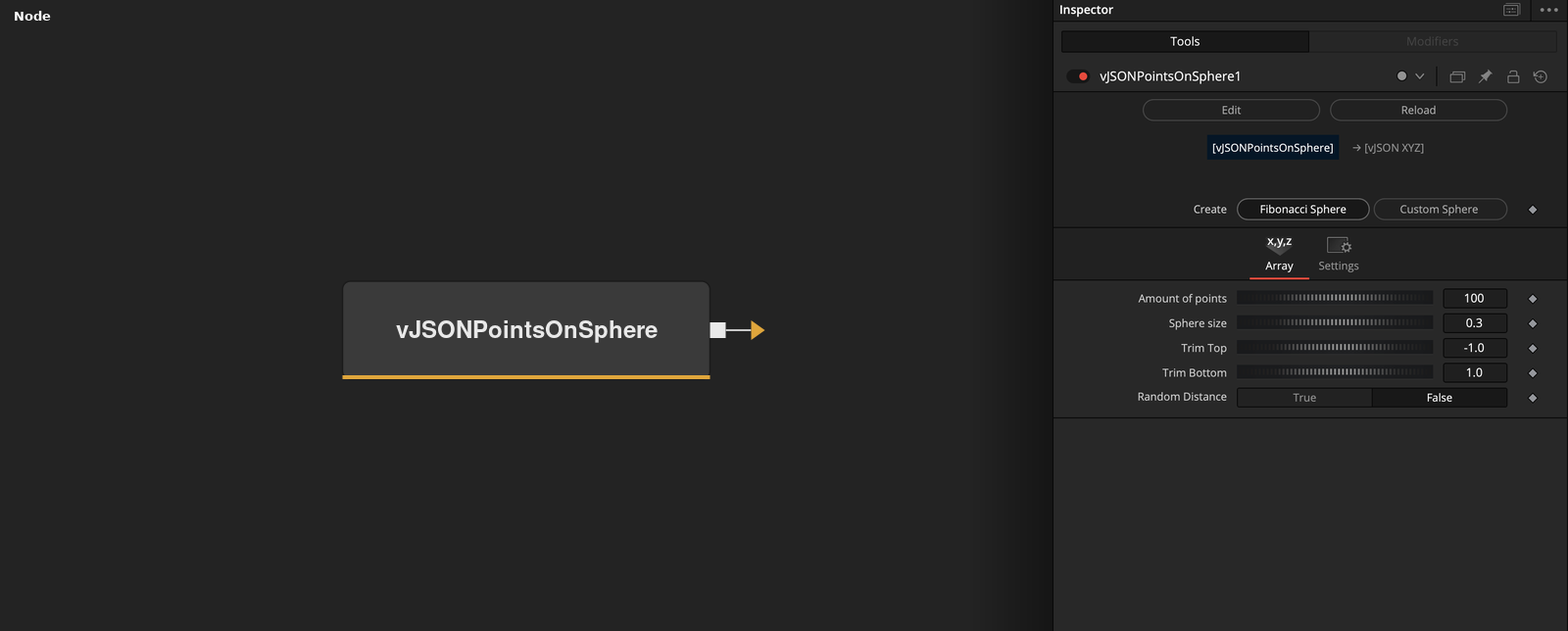
vJSONPointsOnSphere has no input and outputs an array of XYZ points around the origin. Create chooses between a Fibonacci sphere and a random Custom sphere, and the controls shown change with the choice.
Parameters
| Parameter | Type | Default | Description |
|---|---|---|---|
| Create | Dropdown | Fibonacci Sphere | Chooses the Fibonacci Sphere or the Custom Sphere layout. Changing it shows the controls of that layout. Default Fibonacci Sphere. |
| Amount of points | Integer | 100 | Number of points. Minimum 2, default 100. |
| Sphere size | Float | 0.3 | Radius of the sphere. Default 0.3. |
| Random distance | Float | 0 | Custom Sphere only, hidden in Fibonacci mode. Random amount up to this value that is taken off the start distance of each point. Default 0. |
| Random seed | Float | 0 | Custom Sphere uses it to seed the random layout. Hidden in Fibonacci mode, where it still seeds the random distances. Default 0. |
+6 more parameters
| Parameter | Type | Default | Description |
|---|---|---|---|
| Distribution | Dropdown | Uniform | Custom Sphere only. Uniform, Poles or Half. Controls how the random rotation is drawn. Default Uniform. |
| Trim Top | Float | -1 | Removes the bottom part of the sphere. |
| Trim Bottom | Float | 1 | Fibonacci Sphere only. Lower limit for Y before scaling. Range -1 to 1, default -1. |
| Random Distance | Dropdown | False | Fibonacci Sphere only. True adds a second point at a random distance for every point. Default False. |
| Scale Factor | Float | 1 | Hidden control. Multiplier applied to all points in Custom Sphere mode. Default 1. |
| Rotate Factor | Float | 0 | Hidden control. It is not used in the calculation. Default 0. |
Read the full description
In Fibonacci Sphere mode, point i of n has Y = 1 - 2 * i / (n - 1), a horizontal radius of sqrt(1 - Y * Y) and the angle i * pi * (sqrt(5) - 1) around the Y axis, with X = cos(angle) * radius and Z = sin(angle) * radius. All three values are multiplied by Sphere size. The points follow a spiral from the top of the sphere, Y = +1, to the bottom.
Trim Top and Trim Bottom clamp the unscaled Y value. The value of the Trim Top control is the lower limit and the value of the Trim Bottom control is the upper limit, so the labels are the reverse of the Y direction. The defaults of -1 and 1 do not change anything. A point outside the limits keeps its X and Z and gets Y set to the limit, so it is flattened onto a plane and not removed. Setting Random Distance to True writes a second point on the same ray for every point, at a random distance between 0 and Sphere size. Random seed seeds the random generator, and in this mode the control is hidden.
In Custom Sphere mode the node writes Amount of points points at random positions. Each point starts at (Sphere size, 0, 0), or at (-Sphere size, 0, 0) for every second point, minus a random amount up to Random distance, and is rotated by a random rotation. Distribution picks how the random numbers for the rotation are drawn. Uniform draws from -1 to 1, while Poles and Half draw from 0 to 1, which concentrates the points. In Half every point starts at +Sphere size. The result is multiplied by the hidden Scale Factor. Random seed makes the layout repeatable.
With the defaults (Fibonacci Sphere, 100 points, Sphere size 0.3) the node outputs 100 points on a sphere of radius 0.3. Amount of points has a minimum of 2. The hidden Rotate Factor control is not used.
Example Connections
- Draw the sphere points
- Offset the points before drawing
vJSONPointsOnSphere.Output -> vJSONCameraProjection.ArrayA
vJSONCameraProjection.Output -> vJSONShapeRender.ArrayPoint
Background.Output -> vJSONShapeRender.Input
vJSONPointsOnSphere.Output -> vJSONTranslate.ArrayA
vJSONTranslate.Output -> vJSONCameraProjection.ArrayA