vJSONFromAudio
Read the audio samples of the current frame from a 16-bit WAV file, URL or Base64 text into an array of numbers.
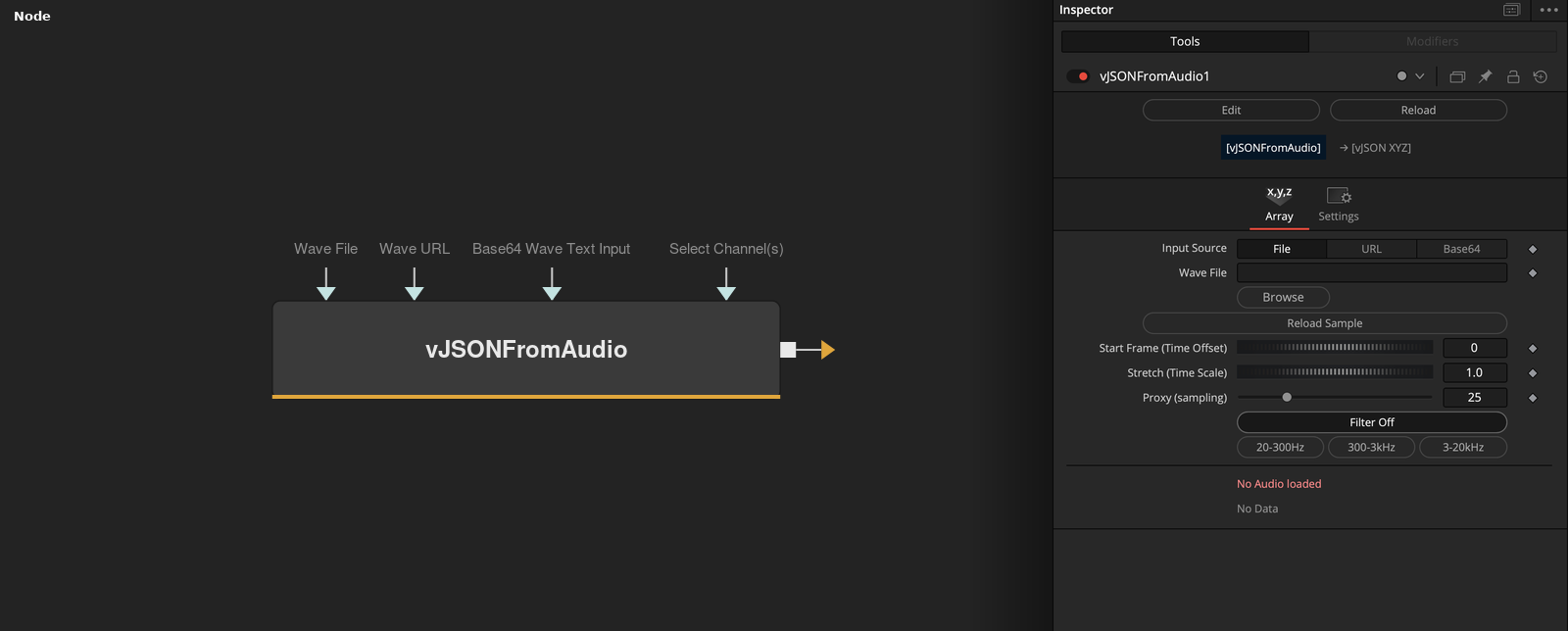
vJSONFromAudio reads a 16-bit PCM WAV file and outputs an array of the sample values that fall within the current frame. Input Source chooses a file, a URL or Base64 text, and Proxy, Start Frame and Stretch decide which samples are taken.
Parameters
| Parameter | Type | Default | Description |
|---|---|---|---|
| Input Source | Dropdown | File | Where the WAV data comes from, File, URL or Base64. Default File. |
| Wave File | Text | — | Path of the WAV file. Shown when Input Source is File. |
| Wave URL | Text | — | Address of a WAV file. Shown when Input Source is URL. |
| Base64 Wave Text Input | Text | — | Base64 text of a WAV file. Shown when Input Source is Base64. |
| Reload Sample | Float | — | Button that reloads the audio data. |
+6 more parameters
| Parameter | Type | Default | Description |
|---|---|---|---|
| Select Channel(s) | FuID | — | Hidden until a stereo file is loaded. Left, Right or Both. Default Both. |
| Start Frame (Time Offset) | Integer | 0 | Frame at which the audio starts. Default 0. |
| Stretch (Time Scale) | Float | 1 | Stretch of the audio over time. Values above 1 slow the audio down. Default 1. |
| Proxy (sampling) | Integer | 25 | Reads every Nth sample of the window. Range 1 to 100, default 25. |
| FiltersOFF | FuID | — | Button that turns the filter off. |
| Filters | FuID | — | Applies a band filter, 20 to 300 Hz, 300 Hz to 3 kHz or 3 to 20 kHz, to the values. |
Read the full description
The node loads the WAV data and reads its header. Only 16-bit PCM files are accepted, and the node reports Unsupported file type or Wrong bit-depth in the label of the node when the header does not match. The label also shows the sample rate and the length of the file in frames. Select Channel(s) is hidden until a stereo file is loaded, and then offers Left, Right and Both.
For frame f, the node takes the samples that belong to the time span of that frame. The window has sample rate / frame rate / Stretch samples for a single channel. The frame rate comes from the composition, and the window starts at (f - Start Frame) frames into the file. Of the samples in the window, only every Proxy-th one is read. Larger Proxy values give fewer values and a faster calculation. A larger Stretch makes the window shorter, so the audio plays more slowly.
The output values are whole numbers from -32768 to 32767. They are not XYZ points, so connect the output to nodes that take a list of values. The Filters buttons run an IIR filter over the values with fixed coefficients, 20 to 300 Hz, 300 Hz to 3 kHz or 3 to 20 kHz, and Filter Off turns it off.
Frames before the Start Frame read the window as zeros. If no file is loaded, the node shows Please load WAVE file and gives no output. Reload Sample is a button that reloads the audio data.
Example Connections
- Convert the audio values to XYZ text
- Pack the values into groups of three
vJSONFromAudio.Output -> vJSONToXYZ.ArrayA
vJSONFromAudio.Output -> vJSONMath.ArrayA