vJSONFromSpline
Sample a mask spline into points, either evenly in curve parameter or evenly in distance.
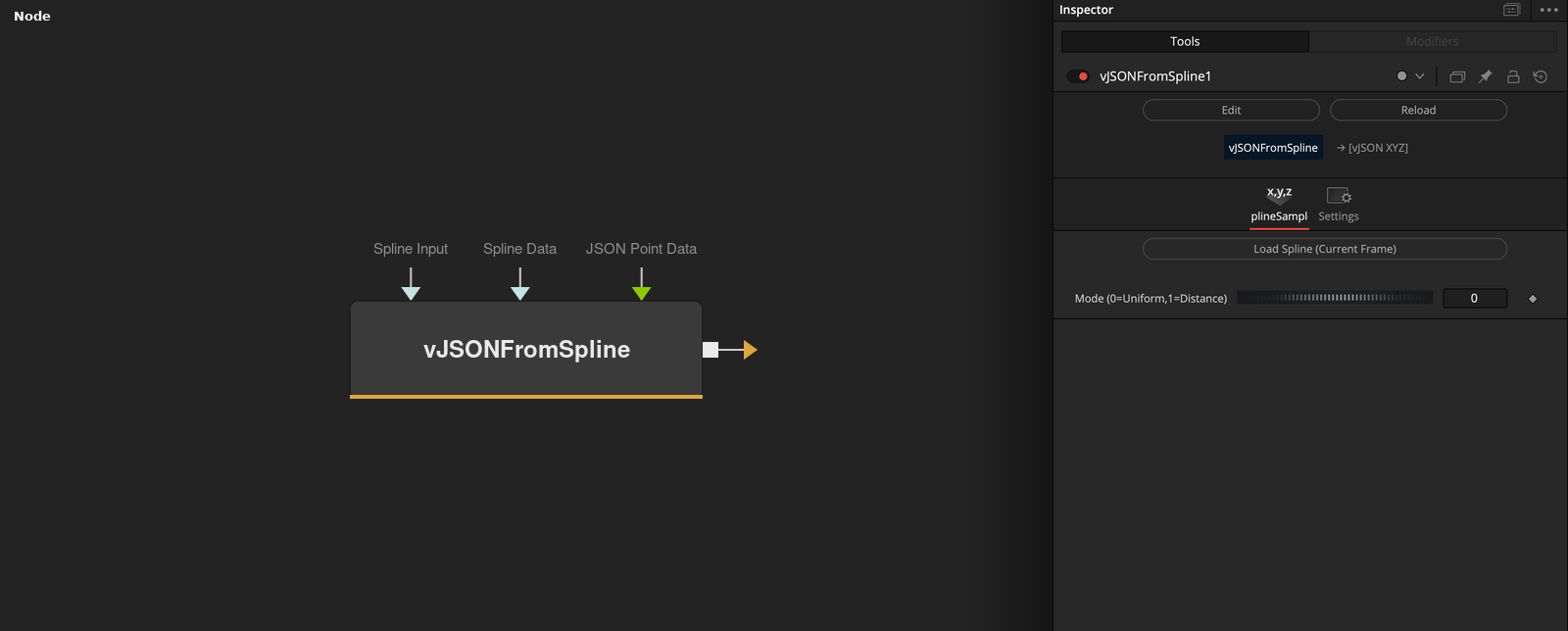
vJSONFromSpline reads the Bezier spline of a connected mask when Load Spline (Current Frame) is pressed, stores it in the node, and outputs an array of XYZ points sampled along it. Mode chooses between uniform parameter spacing and equal distance spacing.
Parameters
| Parameter | Type | Default | Description |
|---|---|---|---|
| Spline Input | Mask | — | Mask tool whose Bezier spline is read by the Load Spline button. |
| Spline Data | Text | — | Hidden control. Stores the spline that was loaded from the mask. |
| Source Width | Float | 0 | Hidden control. Composition frame width stored when the spline is loaded. |
| Source Height | Float | 0 | Hidden control. Composition frame height stored when the spline is loaded. |
| Source Aspect X | Float | 1 | Hidden control. Composition pixel aspect X stored when the spline is loaded. Default 1. |
+11 more parameters
| Parameter | Type | Default | Description |
|---|---|---|---|
| Source Aspect Y | Float | 1 | Hidden control. Composition pixel aspect Y stored when the spline is loaded. Default 1. |
| Load Spline (Current Frame) | Float | — | Button that copies the spline of the connected mask at the current frame into the node. |
| JSON Point Data | Text | — | Hidden control. JSON list of points that is used when no spline is stored. |
| Number of Samples | Integer | 100 | Hidden control. Number of points sampled. Minimum 2, default 100. |
| Mode (0=Uniform,1=Distance) | Integer | 0 | 0 samples evenly in curve parameter, 1 samples evenly by arc length. Range 0 to 1, default 0. |
| Flip X | Integer | 1 | Hidden control. Negates X. Default on. |
| Flip Y | Integer | 1 | Hidden control. Negates Y. Default on. |
| Auto Width (Aspect) | Integer | 0 | Hidden control. Multiplies X by the frame aspect ratio. Default off. |
| Auto Height (Aspect) | Integer | 1 | Hidden control. Multiplies Y by the frame height over width ratio. Default on. |
| Width Scale | Float | 1.5 | Hidden control. X is multiplied by this value plus 0.5. Default 1.5. |
| Height Scale | Float | 1.5 | Hidden control. Y is multiplied by this value plus 0.5. Default 1.5. |
Read the full description
Load Spline (Current Frame) copies the Bezier polyline of the tool connected to Spline Input, at the current time, into the hidden Spline Data control. It also stores the composition frame size and pixel aspect. The node samples this stored copy, so a change to the mask is picked up only when the button is pressed again.
Each spline segment is a cubic Bezier curve made from its two points and their handles. A closed spline includes the segment back to the start. In Uniform mode (0) the samples are spaced evenly in curve parameter, so each segment receives the same share of points whatever its length. In Distance mode (1) the samples are spaced evenly by arc length over the whole spline, with 32 subdivisions of each segment used to measure length. The number of samples comes from the hidden Number of Samples control, default 100. All points have Z = 0.
The points are then changed in this order. Flip X and Flip Y negate the values. X is multiplied by Width Scale + 0.5, and by the frame aspect (width * pixel aspect X / height * pixel aspect Y) when Auto Width is on. Y is converted by the frame height over width ratio when Auto Height is on, and multiplied by Height Scale + 0.5. With the defaults (flips on, Auto Width off, Auto Height on, both scales 1.5) X is multiplied by 2 and Y is multiplied by 2 and by the frame height over width ratio.
If no spline is stored, the node falls back to the hidden JSON Point Data text, a JSON list of [x, y] or [x, y, z] entries, which goes through the same flips and scales. Only Mode and the Load button are visible. The other controls are hidden and can be changed from a script or a connection.
Example Connections
- Sample a mask spline and draw it
- Offset the points before drawing
Polygon.Mask -> vJSONFromSpline.SplineInput
vJSONFromSpline.Output -> vJSONCameraProjection.ArrayA
vJSONCameraProjection.Output -> vJSONShapeRender.ArrayPoint
Background.Output -> vJSONShapeRender.Input
Polygon.Mask -> vJSONFromSpline.SplineInput
vJSONFromSpline.Output -> vJSONTranslate.ArrayA
vJSONTranslate.Output -> vJSONCameraProjection.ArrayA