vJSONStagger
Offsets each point on X, Y and Z with a time-based curve that is shifted per point index.
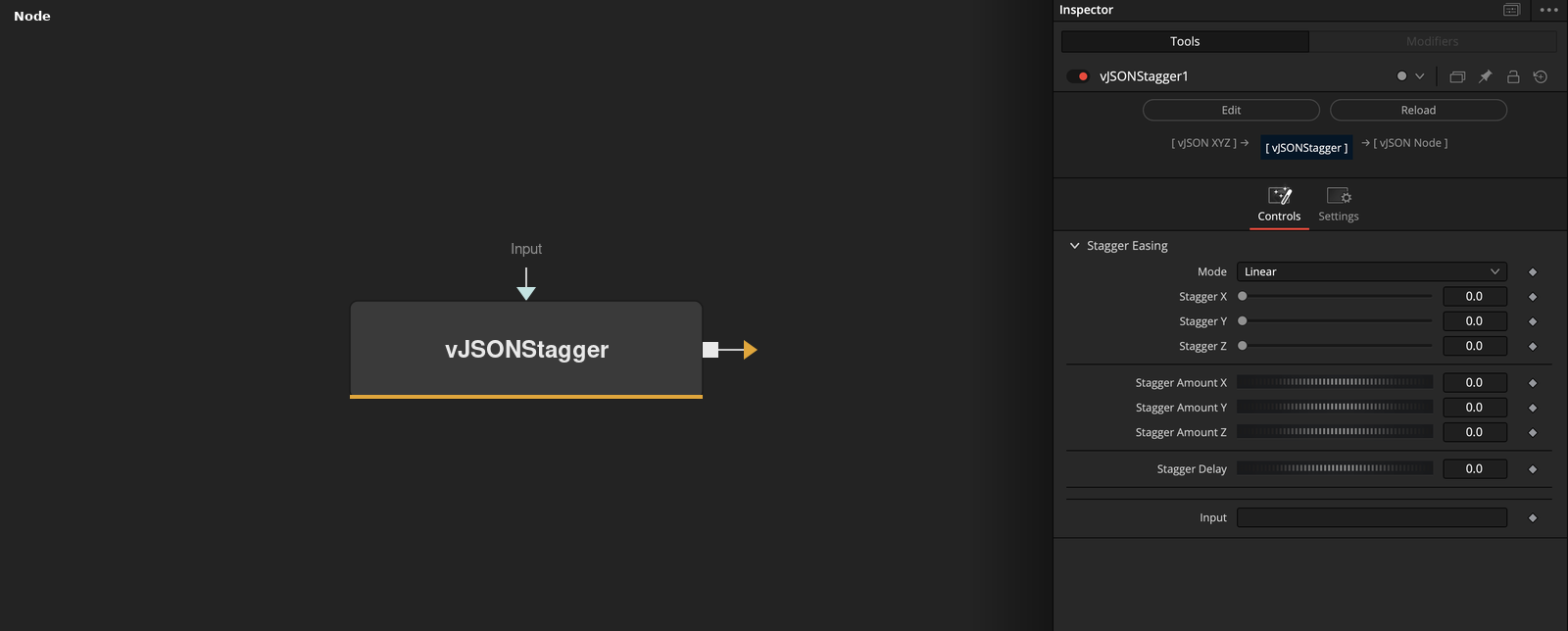
vJSONStagger takes an array of XYZ points and adds an animated offset to each axis. Mode picks the curve, and Stagger and Stagger Amount scale it per axis; both default to 0, so nothing moves until they are set.
Parameters
| Parameter | Type | Default | Description |
|---|---|---|---|
| Mode | Dropdown | Linear | Offset curve: Linear, Wave, Exponential, Pulse Wave, Triangle Wave or Sawtooth Wave. Default Linear. |
| Stagger X | Float | 0.0 | Strength of the offset on X, multiplied by Stagger Amount X. Slider 0 to 1, default 0. |
| Stagger Y | Float | 0.0 | Strength of the offset on Y, multiplied by Stagger Amount Y. Slider 0 to 1, default 0. |
| Stagger Z | Float | 0.0 | Strength of the offset on Z, multiplied by Stagger Amount Z. Slider 0 to 1, default 0. |
| Stagger Amount X | Float | 0.0 | Size of the X offset, multiplied by Stagger X. Range -10 to 10, default 0. |
+12 more parameters
| Parameter | Type | Default | Description |
|---|---|---|---|
| Stagger Amount Y | Float | 0.0 | Size of the Y offset, multiplied by Stagger Y. Range -10 to 10, default 0. |
| Stagger Amount Z | Float | 0.0 | Size of the Z offset, multiplied by Stagger Z. Range -10 to 10, default 0. |
| Stagger Delay | Float | 0.0 | Time shift per point index. Minimum 0, default 0. Exponential applies it at one tenth of the value. |
| Wave Frequency | Float | 0.01 | Frequency of the curve in Wave, Pulse Wave, Triangle Wave and Sawtooth Wave. Hidden unless one of these modes is selected. Minimum 0, default 0.01. |
| Clamp Output | Float | 0.0 | Hidden control. Not read by the code. |
| Min Value | Float | 0 | Hidden control. Not read by the code. Default 0. |
| Max Value | Float | 1 | Hidden control. Not read by the code. Default 1. |
| Reverse Index | Float | 1.0 | Hidden control. Not read by the code. |
| Yoyo | Float | 1.0 | Hidden control. Not read by the code. |
| Steps (for Step/Staircase) | Float | 5 | Hidden control. Not read by the code. Range 1 to 100, default 5. |
| Pulse Width (for Pulse Wave) | Float | 0.5 | Share of each cycle at full value in Pulse Wave, from 0.01 to 1, default 0.5. Hidden unless Pulse Wave is selected. |
| Input | Text | — | Data to process. |
Read the full description
For each point the node adds Stagger Amount * Stagger * curve to each axis. The curve depends on Mode, the point index starting at 0, Stagger Delay and the render time, so the result changes from frame to frame.
Stagger, Stagger Amount and Stagger Delay all default to 0. Points pass through unchanged until Stagger and Stagger Amount are set, and a delay of 0 gives every point the same curve value. A larger delay shifts each point in time by its index times the delay.
Linear is 0.1 times the shifted time, a straight ramp. Exponential is 1 - exp(-0.1 * t), with t the shifted time and not below 0, so it rises toward 1. Neither reads Wave Frequency, which the other four modes use and which defaults to 0.01. Six hidden controls are not read by the code.
Example Connections
- Animate a grid and draw it
- Add a fixed offset after the animation
vJSONPointsOnGrid.Output -> vJSONStagger.Input
vJSONStagger.OutputData -> vJSONCameraProjection.ArrayA
vJSONCameraProjection.Output -> vJSONShapeRender.ArrayPoint
Background.Output -> vJSONShapeRender.Input
vJSONPointsOnCircle.Output -> vJSONStagger.Input
vJSONStagger.OutputData -> vJSONTranslate.Input